


-
173 Views
shares
By setting clear goals, tracking the right metrics, and acting on insights, you can transform your website into a high-performing asset that delivers results.
In the digital age, having a website isn’t enough—you need to understand how users interact with it and how to improve their experience. Website analytics tools are your secret weapon for unlocking valuable insights about your audience, website performance, and opportunities for growth. But how do you effectively use these tools, and what value do they bring to the table? Let’s dive in.
What Are Website Analytics Tools?
Website analytics tools are software platforms that collect, measure, and analyze data about your website and its visitors. From tracking page views to understanding user behavior, these tools provide actionable insights to help you make informed decisions. Popular analytics platforms include Google Analytics, Hotjar, and SEMrush, among others.
How to use website analytics tools
1. Set Clear Goals
Before diving into analytics, define what you want to achieve with your website. Are you aiming to boost traffic, increase conversions, or reduce bounce rates? Clear goals will guide your focus and help you make the most of the data.
Example Goals:
– Increase sales by 15% in the next quarter.
– Improve average session duration by 20%.
– Reduce cart abandonment by 10%.
2. Implement Tracking Tools
To gather data, you’ll need to integrate tracking tools into your website. Most analytics platforms provide a tracking code or plugin to install. For example, Google Analytics requires you to add a JavaScript snippet to your site.
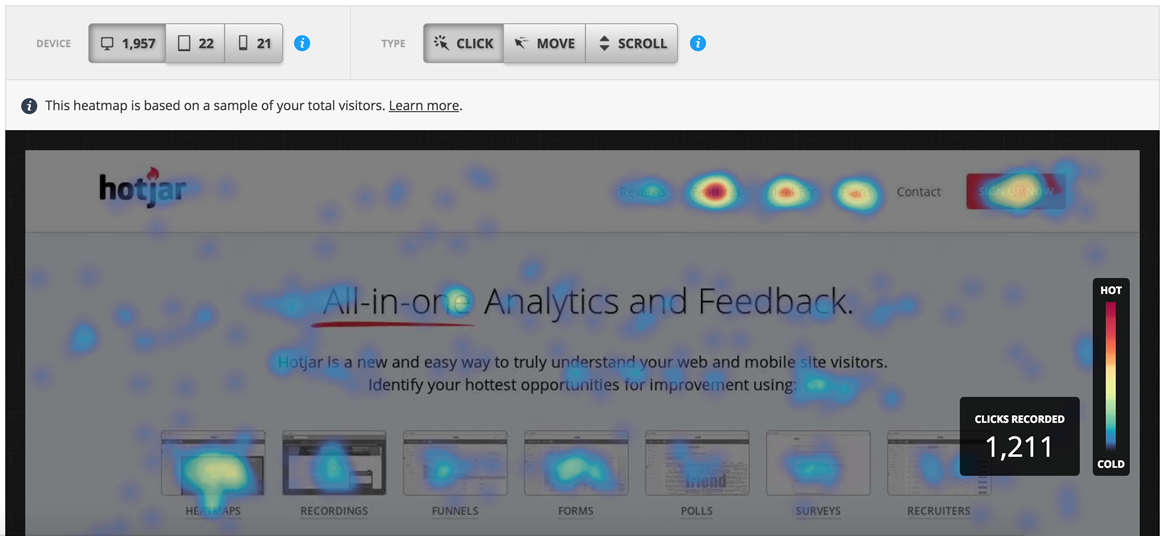
Additionally, tools like Hotjar or Crazy Egg can be installed to track heatmaps or record user sessions for deeper insights.
3. Monitor Key Metrics
Once your tracking tools are set up, start monitoring key metrics. Here are some common ones to focus on:
Traffic Metrics: Number of visitors, page views, and unique visitors.
Engagement Metrics: Bounce rate, average session duration, and pages per session.
Conversion Metrics: Goal completions, e-commerce sales, and form submissions.
Audience Insights: Demographics, geographic locations, and devices used.
Most tools have dashboards that make it easy to visualize these metrics at a glance.
4. Analyze User Behavior
Use tools like heatmaps and session recordings to understand how users interact with your website. Are they clicking where you want them to? Are they scrolling past important content? This data helps identify friction points that might be hindering conversions.
5. Leverage Reporting and Alerts
Set up automated reports and alerts to stay on top of your website’s performance. For example, Google Analytics lets you create custom dashboards and email reports to keep stakeholders informed.
The value of website analytics tools
1. Understand Your Audience
Website analytics tools give you a deep understanding of your audience. You can learn:
– Where your visitors are coming from (search engines, social media, email campaigns).
– What devices and browsers they’re using.
– Their demographic profiles, including age, gender, and location.
Knowing your audience helps you tailor your content and campaigns for maximum impact.
- Example Case: An online clothing retailer uses Google Analytics to discover that 70% of its traffic comes from mobile devices. Based on this insight, they redesign their website for mobile-first functionality, leading to a 25% increase in mobile conversions.
2. Improve User Experience
Analyzing metrics like bounce rate, page load time, and session duration reveals where your website might be underperforming. With this data, you can optimize your site’s design, navigation, and content to create a smoother user experience.
Example Case: A travel booking website notices high bounce rates on its destination pages. By using heatmaps and session recordings with tools like Hotjar, they discover users are frustrated by slow-loading images. After optimizing image sizes and improving loading speeds, the bounce rate drops by 15%.
3. Boost Conversion Rates
Analytics tools help identify what’s working—and what’s not. For example, if a heatmap shows users ignoring a call-to-action button, you can experiment with repositioning it or changing its design. A/B testing tools, often included in analytics platforms, allow you to test different variations and measure their effectiveness.
Example Case: A SaaS company uses A/B testing to experiment with different call-to-action (CTA) buttons on their pricing page. One version includes a clearer value proposition (“Start Free Trial – No Credit Card Needed”), resulting in a 30% increase in sign-ups.
4. Optimize Marketing Campaigns
By tracking campaign performance, you can see which efforts are driving the most traffic and conversions. For example, if you’re running a paid ad campaign, you can measure ROI and reallocate your budget to the most effective channels.
Example Case: A fitness brand runs multiple ad campaigns across Facebook, Google Ads, and Instagram. By using analytics to measure ROI, they find that Instagram ads generate the highest conversion rates. As a result, they shift more budget to Instagram, increasing overall sales by 20%.
5. Track Business Goals
Analytics tools tie your website performance to broader business goals. By tracking KPIs, you can measure progress and adjust your strategy to meet objectives.
Example Case: A non-profit organization tracks donations using conversion goals in Google Analytics. They discover that donation form completion rates are lower on desktop compared to mobile. By simplifying the desktop form design, they achieve a 40% increase in donations over three months.

Popular Website Analytics Tools
Here’s a quick overview of some top analytics platforms:
Google Analytics: A comprehensive tool for tracking website traffic, user behavior, and conversions.
Hotjar: Offers heatmaps, session recordings, and feedback tools to understand user interactions.
SEMrush: Focuses on SEO and competitor analysis to improve your search rankings.
Crazy Egg: Provides insights into where users click and scroll, helping optimize your design.
Matomo: A privacy-focused alternative to Google Analytics, offering similar functionalities.
Best Practices for Using Website Analytics Tools
Regularly Review Your Data: Don’t just set it and forget it—analytics requires consistent monitoring to stay ahead of trends.
Act on Insights: Data is only valuable if you use it. Implement changes based on what your analytics reveal.
Combine Tools: Use a mix of tools for a comprehensive view of your website. For example, pair Google Analytics with Hotjar for both quantitative and qualitative insights.
Stay GDPR-Compliant: Ensure your website analytics setup complies with data privacy regulations like GDPR or CCPA.
Website analytics tools are indispensable for understanding your audience, improving user experience, and driving business growth. By setting clear goals, tracking the right metrics, and acting on insights, you can transform your website into a high-performing asset that delivers results.
Are you ready to unlock the full potential of your website? Start using analytics tools today and watch your online presence thrive!